Emmet-Style Expansion
Expand short patterns into complete Markdown structures. Professional documentation layouts in seconds.
Accelerate development cycles with a native C++ core. Zero-latency typing. Professional Vue.js development environment.
A 10MB IDE built on native C++ architecture. Engineered for professional developers who demand performance and precision.
Explorer
<template>
  <main class="app">
    <h1>
      HBuilderX Native Engine
    </h1>

    <section v-if="zeroLatency">
      <code>0.5s startup • native C++ core</code>
    </section>
  </main>
</template>

<script setup lang="ts">
const zeroLatency = true
</script>
Native C++ Architecture
Zero-latency typing and instant file operations.
Vue.js Development
Professional-grade tooling for Vue ecosystem.
Unofficial expert-led HBuilderX overview
Professional development environment engineered for modern web engineering. Built on native C++ architecture for zero-latency performance, comprehensive Vue.js development tooling, and enterprise-grade Markdown engineering workflows.
Designed by developers, for developers. Optimized for professional teams building production applications with Vue, uni-app, and documentation-heavy projects.
Last updated:
Technical Authority
10+ years of professional Windows development, enterprise IDE customization, and modern JavaScript framework expertise.
Topic cluster
Explore these focused sections to go deeper into each part of the HBuilderX experience:
Enterprise-grade tooling engineered for modern web development workflows
PERFORMANCE
Zero-latency typing and instant large-file operations. Engineered for professional development cycles with native C++ core.
.gif)
.gif)
VUE.JS
Professional-grade tooling for Vue ecosystem. Advanced syntax analysis, intelligent refactoring, and seamless SFC navigation.
MARKDOWN
Enterprise-grade documentation workflows. Split-screen preview, real-time synchronization, and professional formatting tools.
# Release Notes
- Live preview & sync
- Professional formatting
.gif)
Light
core size
0.5s
Startup Time
2M+
Developers
.png)
Professional documentation workflows with enterprise-grade Markdown tooling. Advanced shortcuts, real-time preview, and production-ready formatting.
Expand short patterns into complete Markdown structures. Professional documentation layouts in seconds.
Professional keyboard workflows for formatting, navigation, and structure manipulation without breaking flow.
Split-screen preview with synchronized scrolling. Professional documentation editing experience.
Multi-cursor editing, search and replace, and selection expansion all work inside Markdown, helping you refactor large docs and release notes with the same tools you use on source files.
Whether you’re updating a README, documenting APIs, or writing change logs, HX keeps formatting consistent and makes repetitive structures trivial to maintain.
Professional development efficiency. Engineered for keyboard-driven workflows: multi-cursor editing, intelligent selection, and advanced navigation.
Mouse-less coding
Fast navigation, editing, and refactor loops.
Multi-cursor
Edit repeated patterns in seconds.
Smart selection
Expand semantic ranges without precision dragging.
Search & jump
Move through codebases with minimal friction.
Multi-cursor demo (visual)
Fast edits
// multi-cursor edit: change repeated props in one shot
const buttons = [
  { label: "Download",  variant: "primary" },
  { label: "Docs",      variant: "primary" },
  { label: "Plugins",   variant: "primary" },
]
Tip: Replace these GIFs with curated screenshots or official media if you have them.
Professional AI code completion via GitHub Copilot integration. Context-aware suggestions, seamless workflow integration, and enterprise-grade productivity.
Intelligent code suggestions that understand your project context. Accept, modify, or ignore—maintain full control over your development workflow.
// accept suggestion → keep typing
// reject suggestion → continue your intent
// repeat → faster throughput, same control
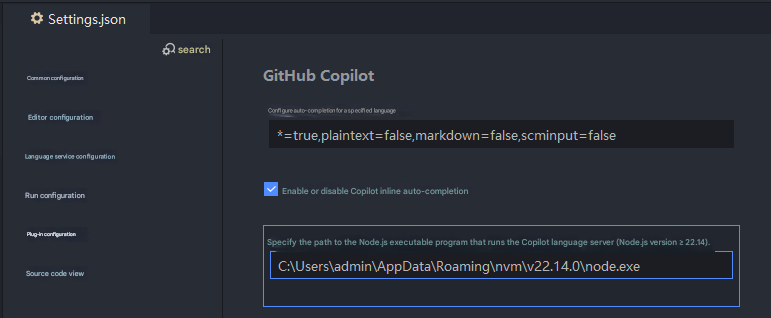
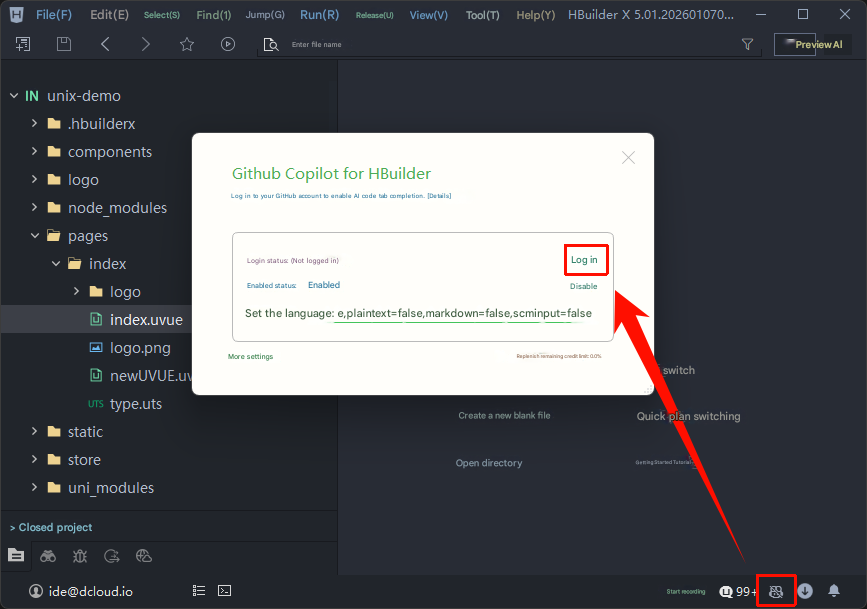
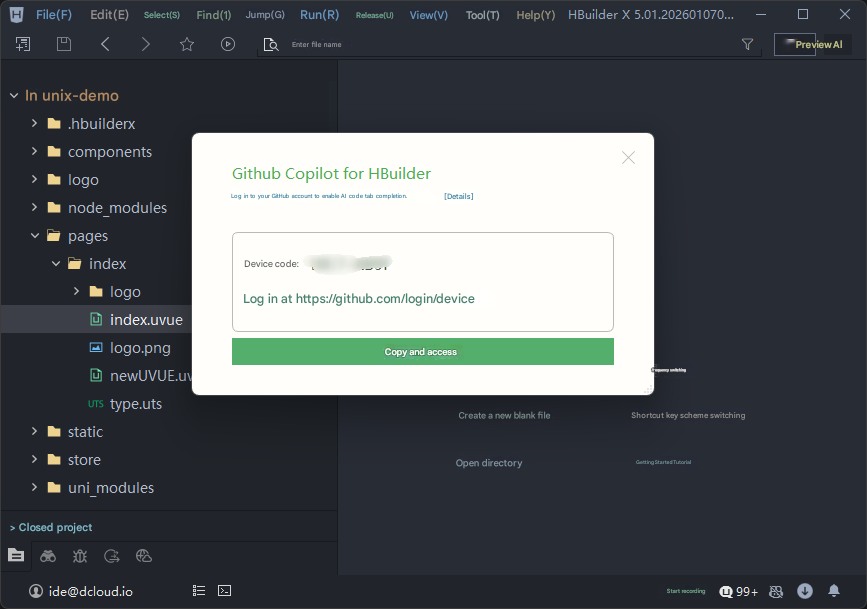
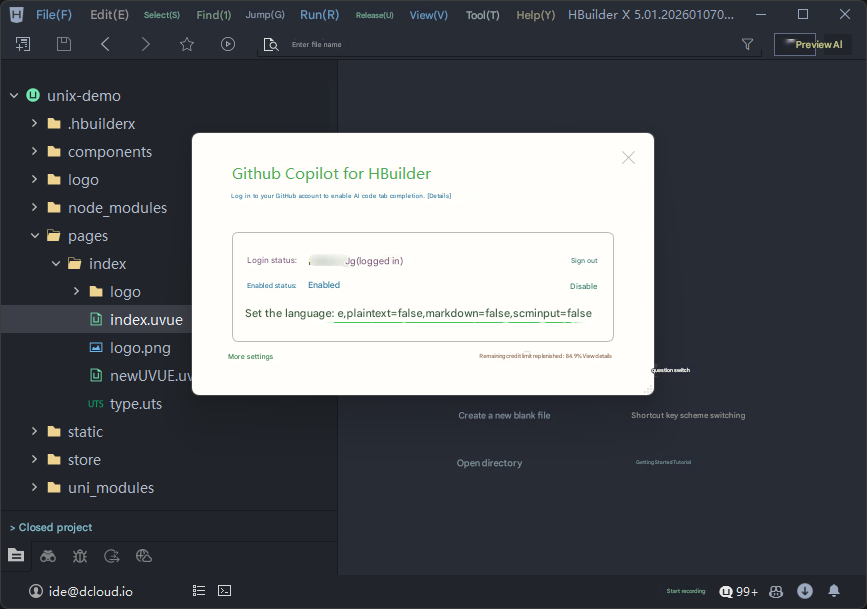
Enable the Copilot plugin inside HX and sign in when prompted, then start using AI suggestions in your normal editing workflow.

AI, without leaving your editor
Inline suggestions, keyboard-first acceptance, and a smoother editing loop—built to keep you in flow.
Professional development environment for modern web engineering
Windows
Download for Windows
Professional development on Windows 10/11
DownloadStandard / App Development
Performance you can verify
Built with a native C++ engine and a compact installer size, HBuilderX is designed for low memory use and fast startup on real developer machines.
Developer-focused workflows
From Vue single-file components to Markdown docs and uni-app projects, each section on this page reflects practical, field-tested use cases.
Transparent, no-nonsense setup
Direct download links, clear AI setup steps, and keyboard-friendly navigation make it easy to evaluate HBuilderX without hidden steps or lock-in.
.png)
HX includes thoughtful details to help reduce eye strain and fatigue during long sessions, so you can stay productive without burning out.
The interface is optimized for dark backgrounds and soft contrast so that code, panels, and sidebars are easy to read without harsh glare.
Modern font rendering and clear spacing make it easier to scan code and Markdown, helping your eyes track lines with less effort.
Rich shortcuts, multi-cursor editing, and quick commands reduce unnecessary mouse movement and repetitive strain.
A responsive editor means less waiting and fewer context switches, keeping your focus steady instead of constantly stopping and starting.
Clean visual hierarchy and focused tool panels help reduce noise on screen, so your attention stays on the code that matters.
HX is designed with long-term use in mind—pair it with regular breaks, posture checks, and sensible brightness to protect your eyes and hands over time.
For advanced users, the following examples show how you might integrate HBuilderX into scripts or configure environment settings when working on Windows-based workflows.
Launch HBuilderX from PowerShell
cd "C:\Program Files\HBuilderX"
.\HBuilderX.exe
Set an environment variable for HX workspace
$env:HX_WORKSPACE="C:\Projects\my-app"
Start-Process "C:\Program Files\HBuilderX\HBuilderX.exe" -ArgumentList $env:HX_WORKSPACEQuick answers to common questions about HBuilderX, performance, AI capabilities, and supported workflows.
A quick reference for key terms used on this page, tuned for long-tail searches around HBuilderX, Vue, Markdown, and AI-assisted coding.
A desktop code editor built with a native C++ engine and a small installer size, focused on fast startup and smooth typing for modern web projects.
A `.vue` file that bundles template, script, and style into one component. HBuilderX treats SFCs as a first-class format with hints and navigation.
A framework that lets you build applications for iOS, Android, and the Web from a shared Vue-based codebase, supported directly inside HBuilderX.
A documentation flow that uses Markdown files with shortcuts, snippet expansion, and live preview to maintain README files, changelogs, and docs.
A plugin-powered feature that suggests code inline as you type, based on surrounding context, which you can accept, ignore, or adjust with your own edits.
A set of performance and UX metrics (loading, responsiveness, and visual stability) that this landing page is optimized for to reflect a fast, desktop-friendly experience.